Template inheritance
Template inheritance allows you to extend a parent template and only redefine the blocks you need. A parent template defines named {block} regions; a child template extends it with {extends} and overrides only the blocks it wants to change. Everything else is inherited as-is.
The illustration below shows how this works in practice: page.tpl defines the global structure and declares named {block} regions. product.tpl uses {extends} to inherit from it and overrides only the product-specific blocks. product-pack.tpl in turn extends product.tpl and overrides only the description block, all other blocks are inherited as-is.
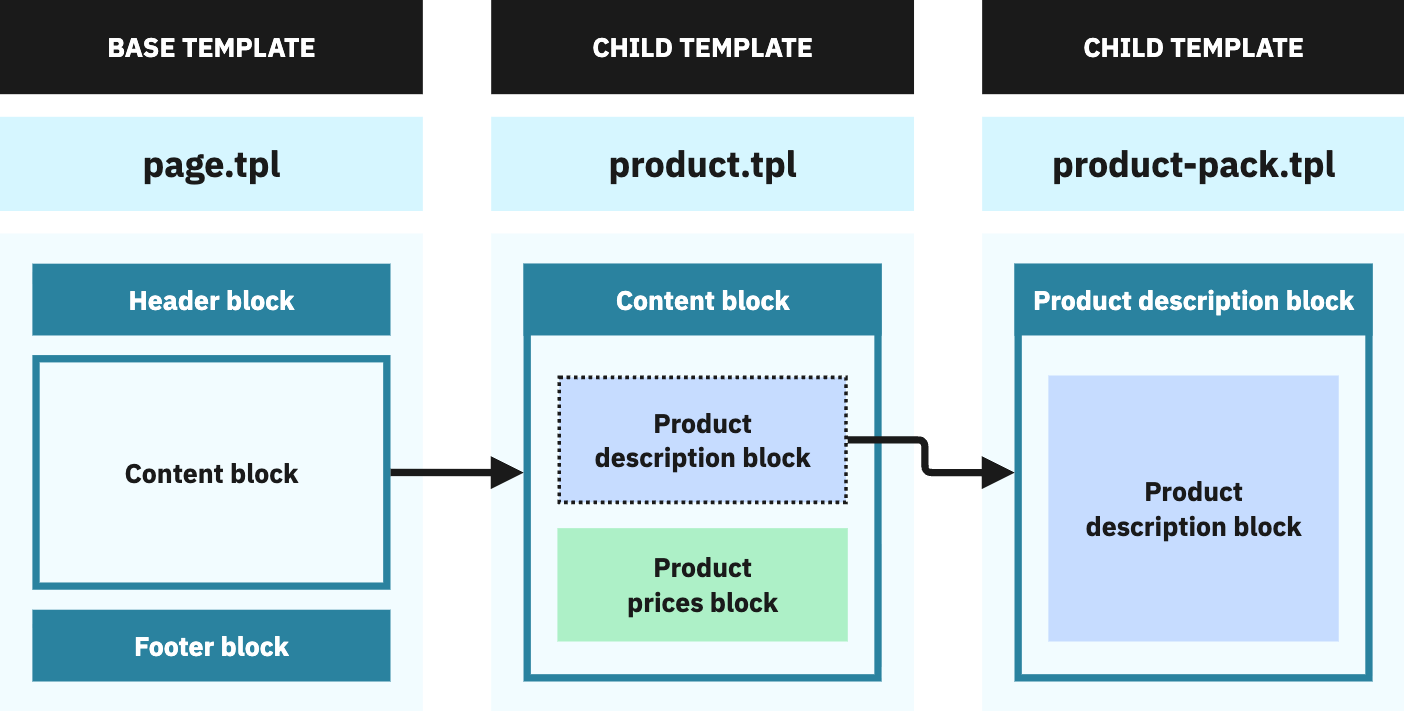
The wrong way of doing this would be to extract header, footer, and reusable parts into fragments and {include} them in each file. This leads to duplication and makes changes harder to maintain.
As the official Smarty documentation puts it:
Template inheritance is an approach to managing templates that resembles object-oriented programming techniques. Instead of the traditional use of
{include …}tags to manage parts of templates, you can inherit the contents of one template to another (like extending a class) and change blocks of content therein (like overriding methods of a class). This keeps template management minimal and efficient, since each template only contains the differences from the template it extends.
Real-world example: product listing pages
Many pages display a list of products: categories, new products, search results, best sellers. They all extend catalog/listing/product-list.tpl:
{* catalog/listing/product-list.tpl: shared base for all listing pages *}
{extends file=$layout}

{block name='content'}
  {block name='product_list_header'}
    {include file='components/page-title-section.tpl' title=$listing.label}
  {/block}

  {hook h='displayHeaderCategory'}

  {if $listing.products|count}
    {block name='product_list_top'}
      {include file='catalog/_partials/products-top.tpl' listing=$listing}
    {/block}

    {block name='product_list_active_filters'}
      {$listing.rendered_active_filters nofilter}
    {/block}

    {block name='product_list'}
      {include file='catalog/_partials/products.tpl' listing=$listing}
    {/block}

    {block name='product_list_bottom'}
      {include file='catalog/_partials/products-bottom.tpl' listing=$listing}
    {/block}
  {else}
    {include file='errors/not-found.tpl'}
  {/if}

  {block name='product_list_footer'}{/block}
{/block}
The base template handles the title, filters, product grid, pagination, and an empty state. For the category page, only the header and footer blocks are overridden to add category-specific content:
{* catalog/listing/category.tpl: only overrides what differs *}
{extends file='catalog/listing/product-list.tpl'}

{block name='product_list_header'}
  {include file='catalog/_partials/category-header.tpl' listing=$listing category=$category}
{/block}

{block name='product_list_footer'}
  {include file='catalog/_partials/category-footer.tpl' listing=$listing category=$category}
{/block}
Everything else, the product grid, pagination, filters, empty state, is inherited from the base template.
Block strategies
Smarty provides three ways to override a block in a child template:
| Strategy | Syntax | Behavior |
|---|---|---|
| Replace | {block name='foo'}...{/block} |
Completely replaces the parent block content |
| Prepend | {block name='foo' prepend}...{/block} |
Adds content before the parent block content |
| Append | {block name='foo' append}...{/block} |
Adds content after the parent block content |
{* Keep the original header and add a promotional banner below it *}
{block name='product_list_header' append}
  <div class="promo-banner">Free shipping on orders over $50</div>
{/block}
Referencing parent and child content
For more control than prepend/append, Smarty provides two special variables:
{$smarty.block.parent}: used in a child template to insert the parent’s block content at a specific position:
{block name='product_list_header'}
  <div class="custom-wrapper">
    {$smarty.block.parent}
  </div>
{/block}
{$smarty.block.child}: used in a parent template to reference what the child will inject, useful for wrapping child content:
{block name='page_title'}
  <h1>{$smarty.block.child}</h1>
{/block}