RTL support
PrestaShop supports RTL (Right-to-Left) languages like Arabic, Hebrew, and Farsi. When an RTL language is active, PrestaShop adds a lang-rtl CSS class to the <body> tag and automatically loads RTL-specific stylesheets, allowing your theme to mirror its layout.
RTL stylesheets
There are two approaches to providing RTL styles:
CSS override file
PrestaShop loads rtl.css (ID: theme-rtl, priority: 900) after your theme’s main stylesheets when an RTL language is active. Use this file for RTL-specific overrides.
RTL variant files
When the shop displays an RTL language, PrestaShop automatically loads RTL variants of stylesheets if they exist. Variants are discovered by appending _rtl to the filename:
| Original | RTL variant |
|---|---|
theme.css |
theme_rtl.css |
custom.css |
custom_rtl.css |
Automatic generation
PrestaShop can generate RTL stylesheets from your original CSS:
- Go to “Design” > “Theme & Logo” in the Back Office.
- Go to “Adaptation to right-to-left languages” (visible only with an RTL language installed).
- Select your theme, toggle “Generate RTL stylesheet” to Yes, and save.
This generates _rtl.css files for every .css file in the theme.
_rtl.css files. Delete them first to regenerate.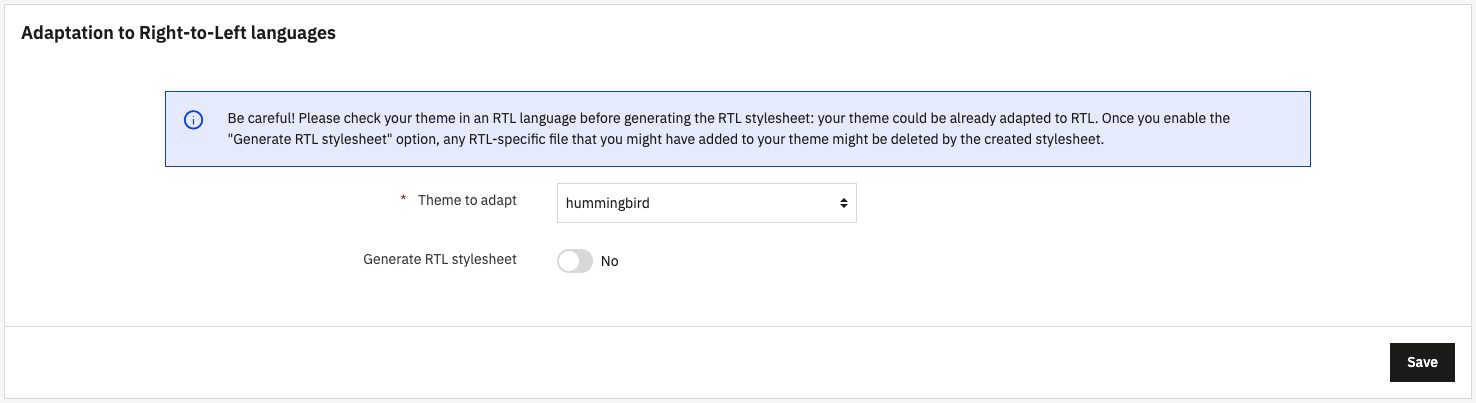
Fine-tuning with .rtlfix files
The automatic RTL generation isn’t always perfect, some CSS rules may not convert correctly. To fix these issues, don’t edit the generated _rtl.css files because they will be overwritten next time you regenerate.
Instead, create a .rtlfix file with the same name as your original stylesheet. PrestaShop will append its contents to the generated RTL file automatically.
Example: your theme has assets/css/theme.css. After generation, you notice a spacing issue in assets/css/theme_rtl.css. To fix it:
- Create
assets/css/theme.rtlfixwith your corrections. - Delete
assets/css/theme_rtl.css. - Regenerate from the Back Office.
PrestaShop will generate a fresh theme_rtl.css from theme.css, then append the contents of theme.rtlfix at the end. Your fixes are preserved across regenerations.
margin-inline-start, padding-inline-end, inset-inline-start, etc.) instead of physical ones (margin-left, padding-right, left). Logical properties automatically adapt to text direction, reducing the need for RTL-specific overrides.